
Cheat LEX for HOOD WARFARE 2
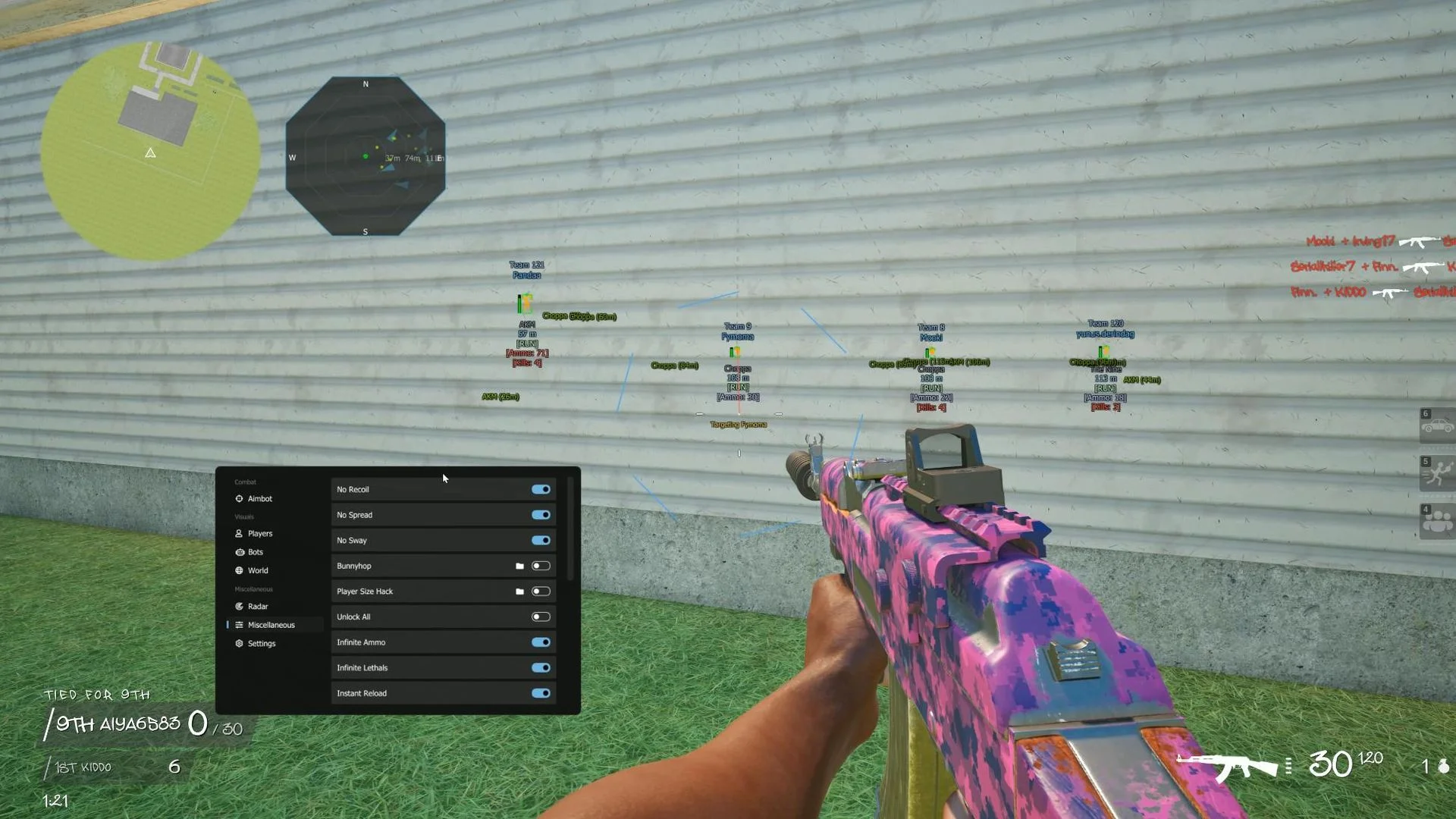
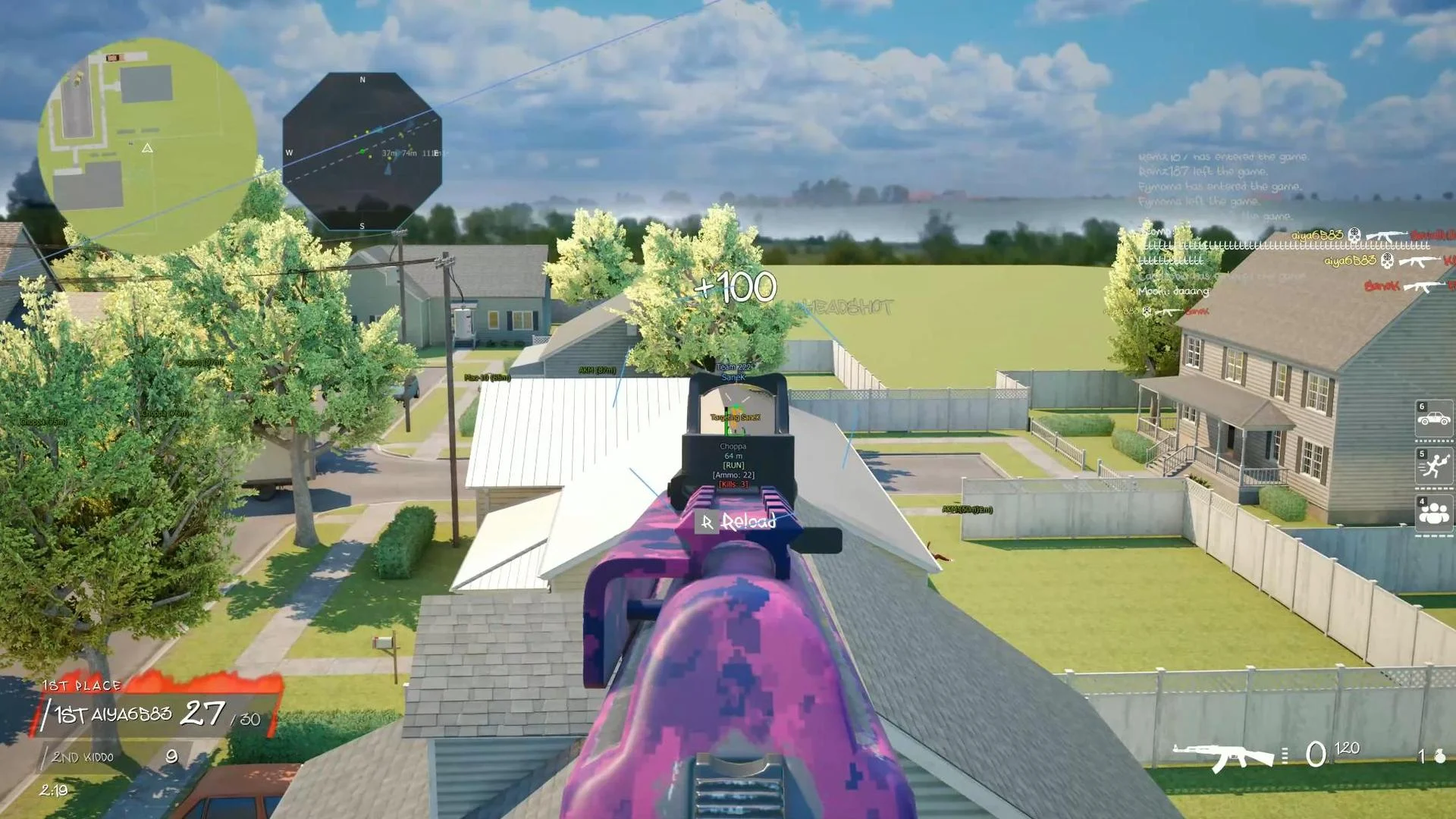
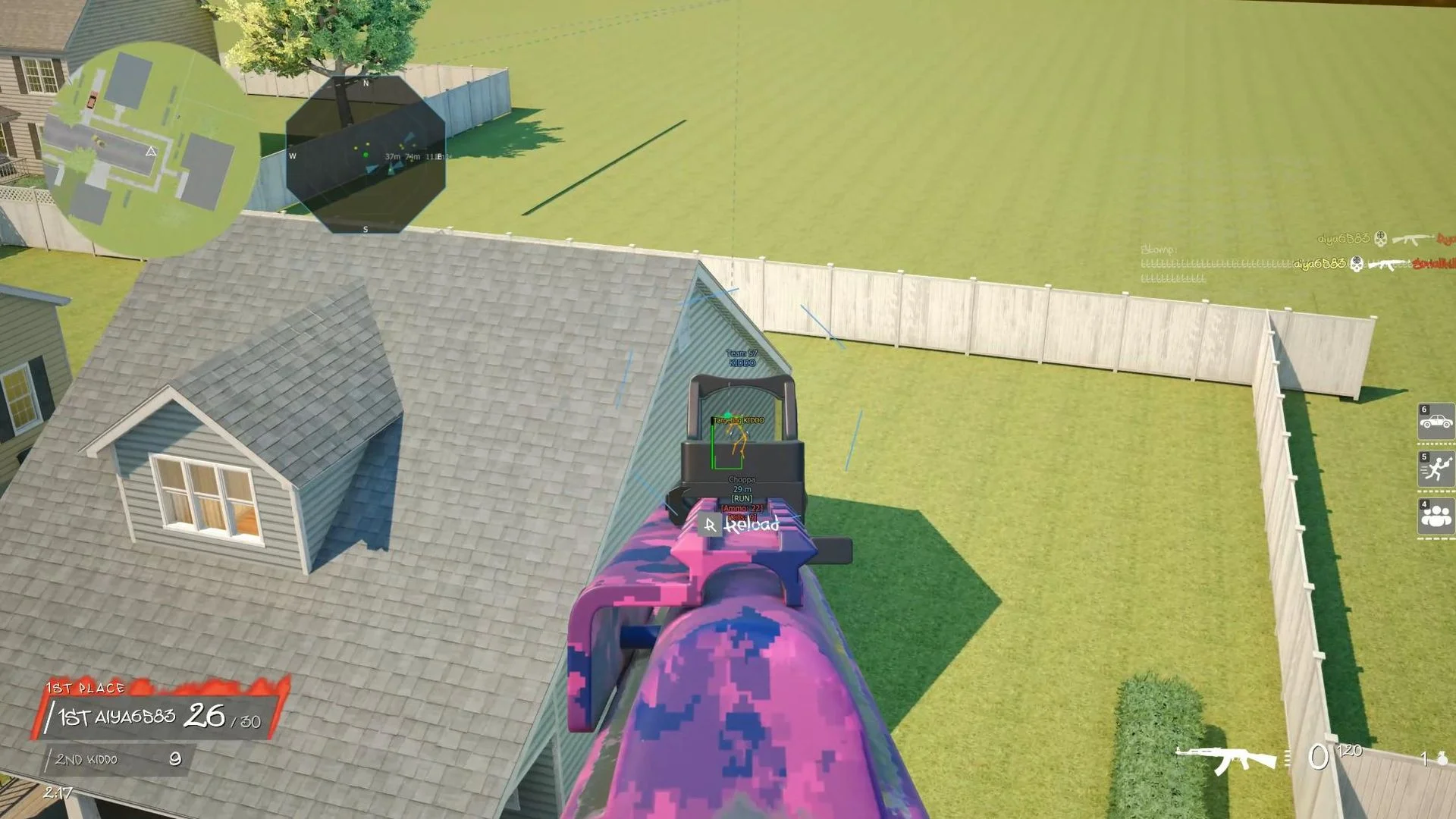
LEX is a multi-feature cheat for Hood Warfare 2, combining configurable aiming behavior with detailed on-screen match information. Player and bot ESP have separate display settings, while the radar offers another way to track the game environment. The product also includes weapon and movement modifiers, with interface settings that can be saved as configurations.
Cheat status: Updated
AIMBOT
Enable aimbot and assign the main aim key
Secondary aim key and a dedicated force-head key
Aimbot modes: Memory and Silent
Aim smoothing toggle and smooth scale
Prediction toggle and prediction scale
Aim only when holding a weapon
Ignore teammates
Target line and target name display
Target visibility check
AIMBOT FOV
Adjustable aimbot FOV radius
Show and fill the FOV circle
Pulsing FOV radius
FOV circle styles: solid, dashed, gradient, pulse glow and RGB rotating
FOV circle thickness, transparency and color
Separate inner and outer gradient colors
Pulsing toggle, pulse speed and pulse range
HITBOX SELECTION
Hitbox selection: head, neck, pelvis or random
PLAYER ESP GENERAL
Maximum player ESP distance
ESP scale
Movement ESP
Team check
Team ID displayed above or below players
Team ID vertical padding and color
PLAYER SKELETON ESP
Player skeleton styles: joints, full, dotted, stickman and dynamic
Skeleton line thickness and color
Hidden-player handling: none, hide or alternate hidden color
Skeleton RGB and gradient with top and bottom colors
Draw joints with adjustable joint scale
Joint shapes: dot, circle, square, diamond or cross
Joint gradient with top and bottom colors and alpha
PLAYER HEAD INDICATOR
Head marker shape: circle, square, diamond, triangle, crosshair, star or hexagon
Head indicator effects: solid, gradient, RGB, visibility, pulse and rotate
Head indicator base color, size scale and thickness
Gradient top and bottom colors
Separate visible and occluded colors
Pulse, rotation and scale speeds
PLAYER DISTANCE ESP
Player distance shown above or below the player
Distance label horizontal and vertical padding
Distance units: meters or feet
Precision: integers, one or two decimal places
Base color and separate colors for visible and hidden players
Distance fading with minimum alpha and fade scale
Distance label background and background color
PLAYER BOX ESP
Box shapes: square, corners, circle, diamond, capsule or hexagon
Box thickness, color and outline with separate outline color
Corner size and corner thickness
Box effects: none, fill, glow, animate, distance scaling, dynamic color or gradient
Fill opacity and glow strength
Box animation speed
Dynamic color modes: static, distance or visibility
Gradient top and bottom colors
PLAYER WEAPON ESP
Player weapon label above or below with vertical padding
Weapon label color effects: static, rarity, visibility, distance fade, RGB, gradient or background
Static color and separate visible/hidden colors
Fade scale and minimum alpha
RGB speed and top/bottom gradient colors
Configurable weapon label background color
PLAYER NAME ESP
Player name above, below or stacked with padding control
Name case: normal, uppercase or lowercase
Name color effects: static, visibility, fade, RGB, gradient or background
Static color plus visible and hidden player colors
Fade scale and minimum alpha
RGB speed and top/bottom gradient colors
Name label background color
PLAYER SNAPLINES
Snapline origin: top, middle or bottom of screen
Base color, thickness and dash length
Snapline styles: solid, dashed or curved
Line effects: none, gradient, RGB, visibility check or lock warning
Top/bottom gradient and separate visible/occluded colors
Lock warning color
Line arrow: filled, hollow or double
Arrow size and color
OTHER PLAYER ESP
Player health bar
Player ammo count
Player kill count
BOT LABELS
Separate AI label with configurable color
Bot tag: short [BOT] or custom text
Bot tag above or below with vertical padding
Bot tag effects: static, visibility, distance fade, RGB, gradient or background
Base color and separate visible/hidden bot colors
Fade scale, minimum alpha and RGB speed
Top/bottom gradient and background color
BOT WEAPON ESP
Bot weapon label above or below with vertical padding
Bot weapon color modes: static, rarity, visibility, fade, RGB, gradient or background
Static color and separate visible/hidden bot colors
Fade scale and minimum alpha
RGB speed and top/bottom gradient colors
Background color
BOT DISTANCE ESP
Bot distance label above or below
Horizontal and vertical label padding
Distance units: meters or feet
Decimal precision: integer, one or two decimal places
Base color and separate colors by visibility
Distance fade, minimum alpha and fade scale
Label background and background color
BOT BOX ESP
Bot boxes: square, corners, circle, diamond, capsule or hexagon
Outline thickness and outline color
Corner size and corner thickness
Box effects: none, fill, glow, animate, distance scaling, dynamic color and gradient
Fill opacity, glow strength and animation speed
Dynamic modes: static, distance or visibility
Top and bottom gradient colors
BOT SNAPLINES
Snapline origin: top, middle or bottom
Base color, thickness and dash length
Styles: solid, dashed or curved
Effects: none, gradient, RGB, visibility check or lock warning
Gradient top/bottom and separate visible/occluded bot colors
Lock warning color
Filled, hollow or double arrows with size and color controls
BOT HEAD INDICATOR
Shape: circle, square, diamond, triangle, crosshair, star or hexagon
Effects: solid, gradient, RGB, visibility, pulse or rotate
Base color, size scale and thickness
Top/bottom gradient and separate visible/occluded colors
Pulse, rotation and scaling speeds
BOT SKELETON ESP
Skeleton styles: joints, full, dotted, stickman or dynamic
Line thickness and color
Hidden-bot display: none, hide or alternate hidden color
Skeleton RGB and gradient with top/bottom colors
Show joints and adjust joint scale
Joint shapes: dot, circle, square, diamond or cross
Joint gradient, top and bottom colors and alpha
WORLD ESP SETTINGS
Loot text layout: vertically stacked or a single horizontal row
Loot stack mode: normal, stack merge or box cluster
Hide loot while aiming down sights (ADS)
Loot FOV dot mode with radius and dot size
Show loot FOV circle
Loot toggle hotkey
Loot colors: static, by rarity, by tier or fade by distance
Loot fade range
Loot distance text and maximum ESP distance
Loot text scale
WORLD ITEM ESP
Dropped weapon ESP with color control
Ammo ESP with color control
Explosive ammo ESP with color control
Medkit ESP with color control
Lethal item ESP with color control
Drive By item ESP with color control
Objective item ESP with color control
RADAR SETTINGS
Enable radar
Radar size and zoom
Distance units: meters or feet
Maximum radar distance
Radar X and Y position
RADAR DISPLAY
Radar shapes: circle, square, corner or border-only
Radar styles: dots, arrows or both
Radar orientation: north-up or player-up
Show radar grid
Radar transparency toggle and amount
Fade radar markers with distance
Threat highlighting with configurable threat distance
Radar hotkey
Draggable or fixed radar positioning
Rotating compass
Show loot on radar
RADAR DOTS AND ARROWS
Radar dot color
Radar dot size and opacity
Radar arrow color
Radar arrow size and opacity
WEAPON AND SHOOTING MODIFIERS
No Recoil
No Spread
No Sway
Unlock All
Infinite Ammo
Infinite Lethals
Instant Reload
Instant ADS
Shoot Through Walls with hotkey and hold/toggle activation
Force Full Auto
Max Damage
Rapid Fire with adjustable scale
MOVEMENT AND GAMEPLAY MODIFIERS
Bunnyhop with dedicated hotkey
Player Size Hack: scale, increase/decrease keys and step per click
FOV Exploit with target FOV setting
Speed Editor with multiplier
Super Jump with multiplier
Fly with toggle key, speed and up/down keys
No Collision option for Fly
VISUAL ZOOM
Smooth Zoom with dedicated zoom key
Target FOV and zoom speed settings
CONTROLS AND INTERFACE
Menu hotkey
Panic key activated by holding for two seconds
Controller support
Stream Proof mode
LANGUAGE AND CONFIGURATION
Interface language selection: Russian, English, Chinese, Turkish, Portuguese, German, Japanese, Vietnamese, French, Hebrew or Thai
Save configuration
Load configuration
Unload cheat