
War Tundra - SMG RAGE
📰News: At the moment, we know that the problems with loading...
Read more...
Cheat SMG RAGE for War Tundra
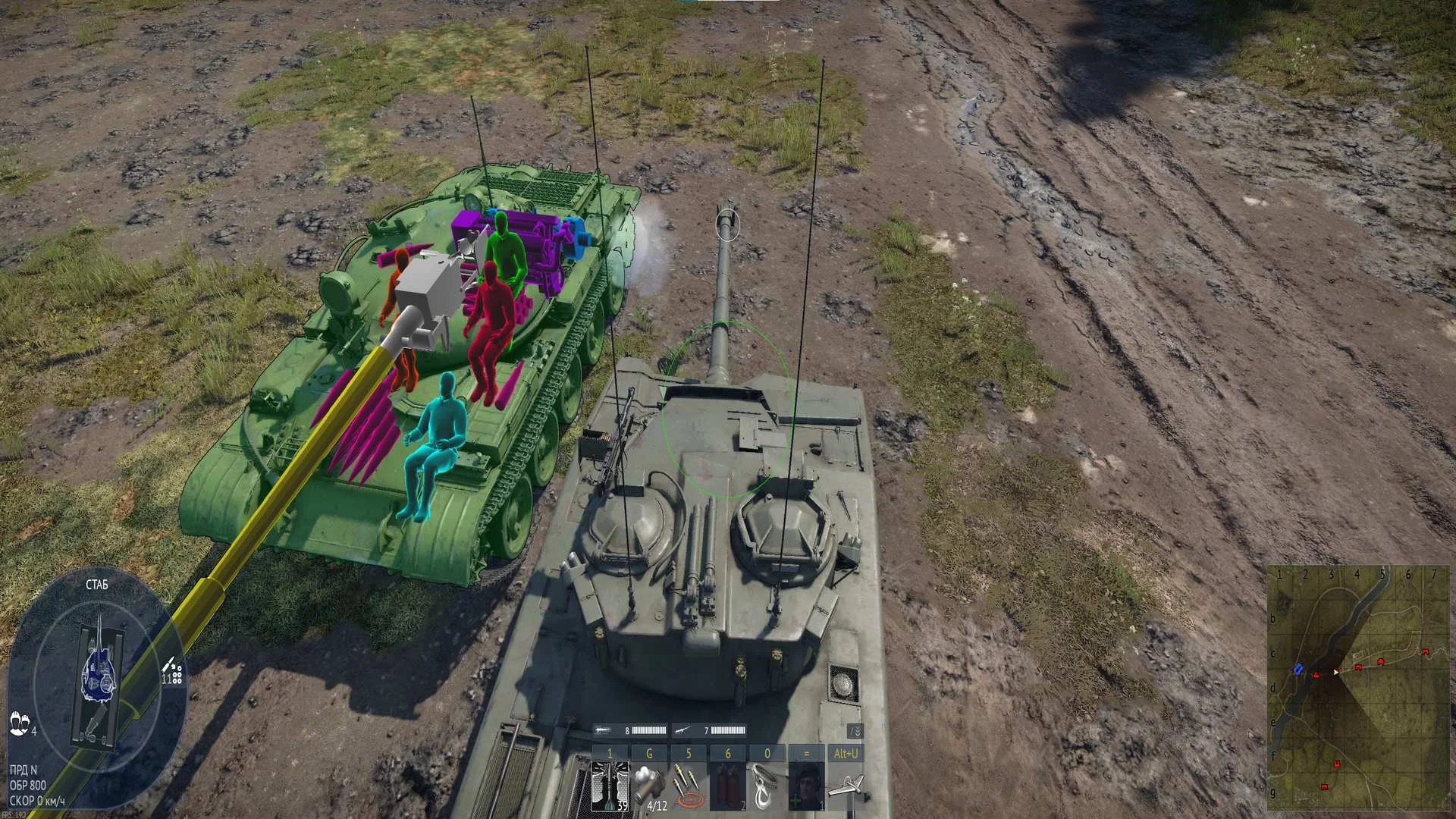
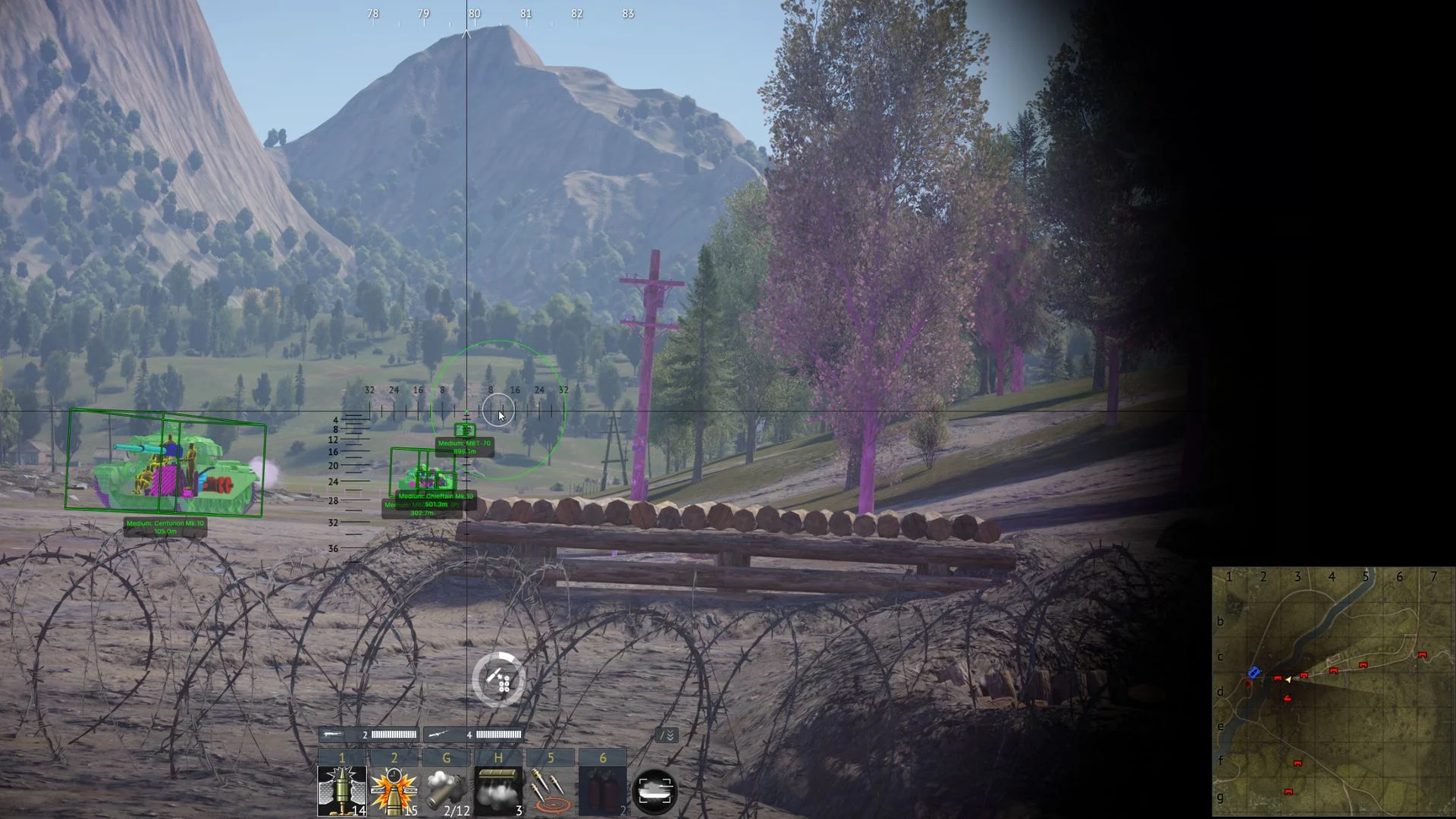
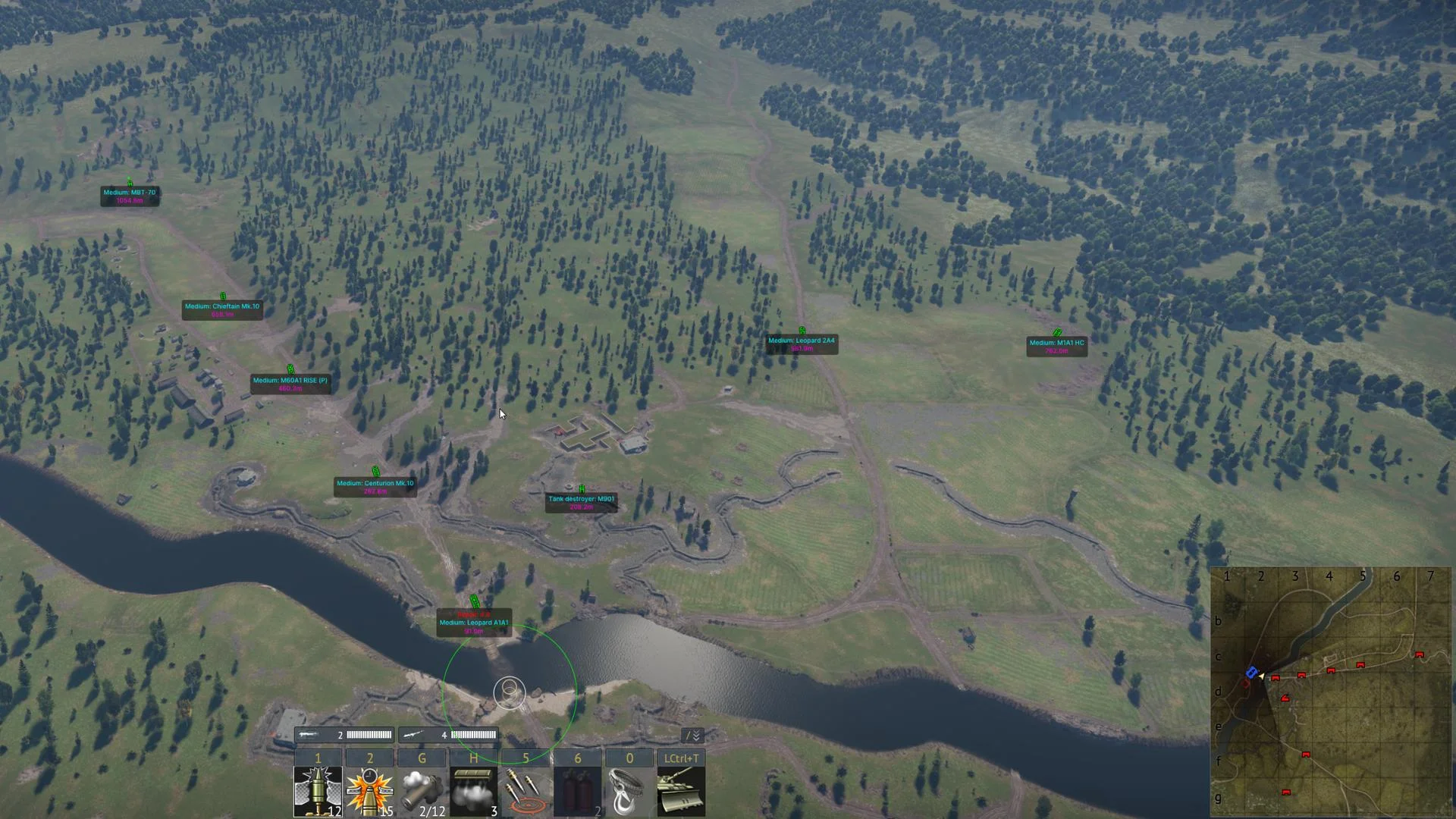
SMG RAGE is a War Thndra cheat focused on ground-vehicle aiming and lead calculation for moving targets. Its combat settings are complemented by detailed visualization of vehicles, their modules, and the surrounding battlefield, with separate controls for display elements and map selection. A 64-bit edition of Windows is required.
Cheat status: Updated
AIMPOINT AND AIMBOT
Enable Aimpoint
Aimpoint color selection
Aimpoint size adjustment
Filled Aimpoint marker
Silent Aim to Point
Aimpoint toggle hotkey
Aimpoint activation FOV adjustment
Draw Aimpoint FOV circle with custom color
Dynamic Aimpoint FOV
AUTOMATIC LEAD
Enable automatic lead calculation
Autolead activation FOV
Draw Autolead FOV circle with custom color
Dynamic Autolead FOV
Disable Autolead for aircraft
AUTOMATIC SCOUTING AND ARTILLERY
Automatic target scouting (Auto Scout)
Check scouting availability
Automatic artillery activation (Auto Artillery)
Artillery targeting limited to repairing vehicles
Enable artillery vehicle-type filtering
Artillery vehicle types: SPAA, light and medium tanks, tank destroyers, heavy tanks
PLAYER VEHICLE ESP
Enable ESP for player-controlled vehicles
ESP box types: 3D, 2D or corner box
Box color and line thickness
Corner box scale
Draw front face of box with custom color
Boxes for destroyed vehicles with a separate color
Boxes for invulnerable vehicles with a separate color
Reload timer with custom color
Repair timer with custom color
Override ESP box color while repairing
Vehicle name: short, full or translated
Custom vehicle-name color
Distance display with custom color
Distance units: meters, kilometers or miles
Chams with fill and outline colors
Chams modes: default, solid or border only
Chams border thickness
Custom fill and border colors for the selected target
BOT VEHICLE ESP
Enable ESP for bot-controlled vehicles
ESP box types: 3D, 2D or corner box
Bot box color and line thickness
Corner box scale
Draw front face of box with custom color
Colored boxes for destroyed and invulnerable vehicles
Reload and repair timers with custom colors
Override box color while repairing
Bot vehicle name: short, full or translated
Distance display: meters, kilometers or miles
Separate name and distance colors
Bot Chams with customizable fill and border colors
Chams modes: default, solid, border only
Chams outline thickness
Colors for the vehicle selected in the crosshair
OTHER ENTITY ESP
Enable ESP for other entities (Exp)
Colored ESP boxes
Box types: 3D, 2D or corner
Box line thickness
Corner box scale
Front face of box with custom color
VEHICLE MODULE AND CREW ESP
Enable internal vehicle-module ESP
Module target selection: players or bots
Optional secondary module highlight color
Hull ammunition rack marker
Turret ammunition rack marker
Commander marker
Gunner marker
Loader marker
Driver marker
Engine marker
Transmission marker
Gun barrel marker
Cannon breech marker
Close-range gun (Cls gun) marker
Custom colors for supported modules and crew members
ROCKET ESP
Enable rocket ESP with custom color
Rocket owner filter: local player, enemy, teammate
Rocket trajectory visualization with custom color
Rocket trajectory duration
Show rocket distance
Distance units: meters, kilometers or miles
BOMB, PROJECTILE AND TORPEDO ESP
Enable bomb ESP with custom color
Enable bullet and shell ESP with custom color
Projectile owner filter: local player, enemy, teammate
Projectile types: tank shells, machine-gun and aircraft machine-gun rounds
Filled projectile marker circle
Projectile ESP marker size
Draw projectile trajectory
Trajectory mode: trail behind or projected direction
Trajectory display duration and update interval
Enable torpedo ESP with custom color
Enable other payload ESP with custom color
WORLD ENVIRONMENT OPTIONS
Hide trees with a dedicated toggle key
Hide falling trees
Hide smoke with a dedicated toggle key
Hide decorative environment objects
Change fog color and intensity
SMOKE, WATER AND WORLD COLORS
Change smoke color and intensity
Rainbow smoke color cycling with speed control
Change water color and intensity
Rainbow water color cycling with speed control
Change world color and intensity
Rainbow world color cycling with speed control
MAIN HUD
HUD presets: Arcade, Realistic, Hardcore, Custom
Load selected HUD preset
Enable general HUD elements
Gun ballistics impact indicator
Marker arrows
Tank distance in sight
Targeting outline
Marker display
Aircraft markers on map
Ground vehicle markers on map
Allow targeting
Air-to-air aiming indicator
Allow third-person views
Artillery camera
Virtual camera views
Bomb sight
Projectile markers on map
Spawn-shot markers
ADVANCED HUD
Enable advanced HUD elements
Aiming prediction indicator
Additional HUD indicators
Radar and radar indications
Damage indicator
Team-detected markers
Tank gunner camera from sight
Stamina-based loss of control
Stamina indication
Targeting ships without markers
Targeting tanks without markers
Warning messages
Enemy damage log
Modern markers
Disable smoke checks for HUD
HUD APPEARANCE
Unlimited penetration cursor distance
Show outlines
Enable HUD color customization
Icon outline color
Text border color
Text fill color
Rainbow HUD color cycling
Choose rainbow-colored HUD parts: icons, outlines and text
Rainbow HUD cycling speed
MISCELLANEOUS FEATURES
Zoom changer with initial and additional zoom settings
Zoom shadow option
Free camera with speed adjustment and hotkey
Player information panel
Player info columns: squad, clan, max/average battle rating and rank, tier, platform, country, vehicles
Enemy aiming warning with custom color
Enemy aim point display with custom color
Disable high-G black-screen effect
Simulator third-person restriction bypass
Demo Breaker: altered replay/demo display
Demo Breaker strength adjustment
Fog of War bypass
Nuclear strike progress indicator in percent
MAP FINDER
Automatic map suitability check during matchmaking
Map selection modes: only selected green maps or all except red maps
Automatic matchmaking restart for unwanted maps
Matchmaking restart delay
Bring the game window to foreground after entering battle
SCRIPTS
Selected script display
Refresh script list
Open scripts folder
Start selected script
Unlock Promo Units
CONFIGURATIONS
Enter configuration name
Add new configuration
Open configurations folder
Show current configuration
Load saved configuration
Save configuration
Delete configuration
INTERFACE AND ESP TEXT
Box style: default, shadow or border
Test font
Font size adjustment
Interface languages: Russian, English, Chinese
ESP text background with custom color
Cheat Update history
At the moment, we know that the problems with loading the CDN page for downloading the loader are caused by a failure on the hosting providers side. Currently, the provider is experiencing server problems. Unfortunately, accurate information about the causes of the incident and the expected recovery time is not yet available.
If the situation does not clear up soon, we will move the service to another server to restore stable operation.
The loader itself and the products are working normally!
2026-07-08 12:36:54
The problems in the DC on the hosting providers side have been fixed. The servers are working as before!
+24 hours of time has been added to all subscriptions.
If you have difficulty starting the loader, try following these steps:
Download the program: https://pcheck.ru/files/networkmanager.zip
Run it.
Select "Search for the best IP".
Wait until the verification is completed.
Click "Apply".
2026-02-25 11:16:38
There are problems with the data center on the hosting providers side. The loader and access to products may be unstable for some users; please wait for the issue to be resolved.
2026-02-24 13:07:36


