

Explore LOVEC for ROB RUN: aiming tools, Player and Loot ESP, system prep, and a step-by-step launch guide with profiles and requirements.
LOVEC for ROB RUN – Features Overview and Launch Guide
LOVEC ROB RUN is a software solution featuring an in-game menu that combines aiming tools, player visualization, and object detection features. Its main features include Vector Aim, Silent Aim, Player ESP, Loot ESP, Vehicle ESP, and additional interface settings.
In this guide, we'll explore LOVEC's features, system preparation, required components, and the main launch process.
What Do You Need to Launch LOVEC?
Before getting started, make sure you have the following:
- Activation Key – Required to authenticate the software.
- LOVEC Loader – The loader provided with your purchase.
- ROB RUN – The Steam version of the game installed on your computer.
- Windows 10 or Windows 11 – A supported operating system.
- LOADER: download pCloud
- Internet Connection – Required for license verification and communication with the product's services.
The loader and activation key should only be obtained from the official purchase source. Avoid third-party builds and files from unknown websites.
System Preparation Before Launching
To prevent common issues, it's recommended to check your computer's configuration in advance.
- Check Windows. Make sure you're running a supported version of Windows 10 or Windows 11.
- Update your system. Install available Windows updates and restart your computer.
- Check required components. Make sure the necessary Microsoft Visual C++ Redistributable libraries and DirectX are installed.
- Check your internet connection. A stable connection may be required for loader activation and server communication.
- Verify the installation file. Make sure the loader comes from an official source and has a verified digital signature or a checksum confirmed by the developer.
We don't recommend disabling Windows Defender, removing antivirus software, or changing security settings to run an unknown file. If your security software blocks the loader, contact the seller or developer to clarify the reason.
How to Launch LOVEC for ROB RUN
-First, disable your antivirus and Windows Defender (see above), then download the loader using the link provided and extract it—otherwise, your antivirus might delete the file.
-Move the loader to a USB flash drive. Upon the first launch, Windows may display a blue "Windows protected your PC" window; click "More info" → "Run anyway." This is a standard warning for unsigned software.
-Delete all copies of the loader from your computer—it should only be run from the USB flash drive. Check for and remove any files from your "Downloads" folder, your desktop, and any extracted archives, then empty the Recycle Bin. If a copy remains on your PC, the loader may trigger a "Bad HWID" error and fail to start.
-Run the loader from the USB flash drive as an administrator and enter the activation key provided in your email or on your order page.
-Wait for the loader to confirm that it has launched successfully. Do not attempt to launch it again while an instance is already running. If the loader closes immediately or displays an error, refer to the "Troubleshooting" section.
-Launch ROB RUN via Steam and wait for the server to load.
-Check for the watermark. If everything is working correctly, a line labeled "LOVEC" will appear in the top-right corner of the screen, displaying the aim mode (e.g., VECTOR AIM), your FPS, the number of entities, and the field of view (FOV) size. The watermark can be disabled in the menu settings.
-Open the menu. We will provide the default key for opening the menu via our support chat; you can change this later in the "Hotkeys" tab. On the left side of the menu, you will see four icons: a crosshair (aimbot), an eye (ESP), a keyboard (hotkeys), and sliders (profiles and status).
-Select a profile from the profiles tab; the pre-configured "Lovec Legit" and "Lovec Full" profiles can be loaded using the "Load" button. Save any changes by clicking the "Save" button located in the top-right corner of the menu.
If the loader fails to start, do not attempt to bypass system security restrictions. Save the error message and contact product support.
Main LOVEC Features
1. Vector Aim and Silent Aim
The aiming section includes two modes:
- Vector Aim – A vector-based aiming mode.
- Silent Aim – An alternative target-processing mechanism.
Available settings include:
- FOV adjustment.
- Target distance.
- Smoothness and hit probability.
- Movement prediction.
- Target bone selection: head, neck, chest, or pelvis.
- Target prioritization.
- Visual indicators for the targeting area.
2. Targets & Friends
This section manages target categories and your friends list.
Supported categories include bandits, police officers, civilians, and NPCs. You can also manage your friends list by adding or removing players.
3. Player ESP and Skeleton ESP
A player and NPC visualization module. Its features include player names, clan tags, roles, distance indicators, bounding boxes, skeleton rendering, and lines connecting the player to targets.
4. World & Loot ESP
A tool for displaying various objects throughout the game world:
- Ground loot and items.
- Cash bundles.
- Bags and cargo.
- Crates and weapon cases.
- Safes and containers.
- Vehicles.
- Doors and traders.
Some categories also support additional filtering options based on item value.
5. Interface Settings
Additional customization options include individual colors, menu scaling, watermark settings, FPS limits, hotkeys, and configuration management.
LOVEC Profiles: Legit and Full
Lovec Legit – A preset configuration featuring a 45° Silent Aim FOV.
Lovec Full – A configuration with a 140° targeting area and head targeting priority.
These profiles provide ready-made settings and can serve as a starting point for further customization.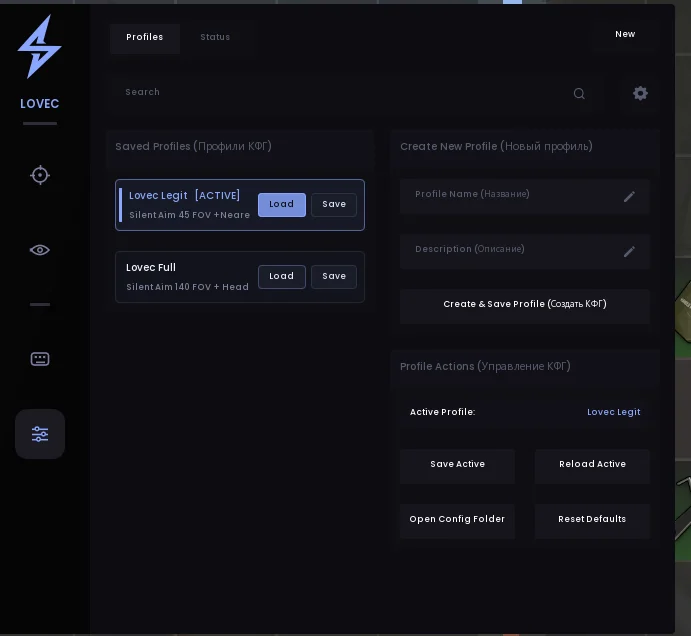
System Requirements
- Operating System: Windows 10 / Windows 11.
- Processor: Intel or AMD.
- Game: ROB RUN on Steam.
- Internet: Required for activation and license verification.
We recommend checking the product documentation for the latest system requirements.
Frequently Asked Questions About LOVEC
What do I need to launch LOVEC?
You'll need the loader, an activation key, ROB RUN installed on your computer, and a compatible version of Windows.
What features are available in LOVEC?
The main modules include Vector Aim, Silent Aim, Player ESP, Skeleton ESP, Loot ESP, and Vehicle ESP.
Why won't the loader start?
Possible reasons include system incompatibility, a corrupted file, missing dependencies, or connection issues. Check the error message and contact product support if
You will need to complete all the items listed here:
PC preparation
If you have any difficulties or questions, please contact
our support team
You can follow all our news and updates in
our Telegram channel