
WARDOGS - PHOENIX
📰News: Hosting Update The following games are now back...
Read more...
Cheat PHOENIX for WARDOGS
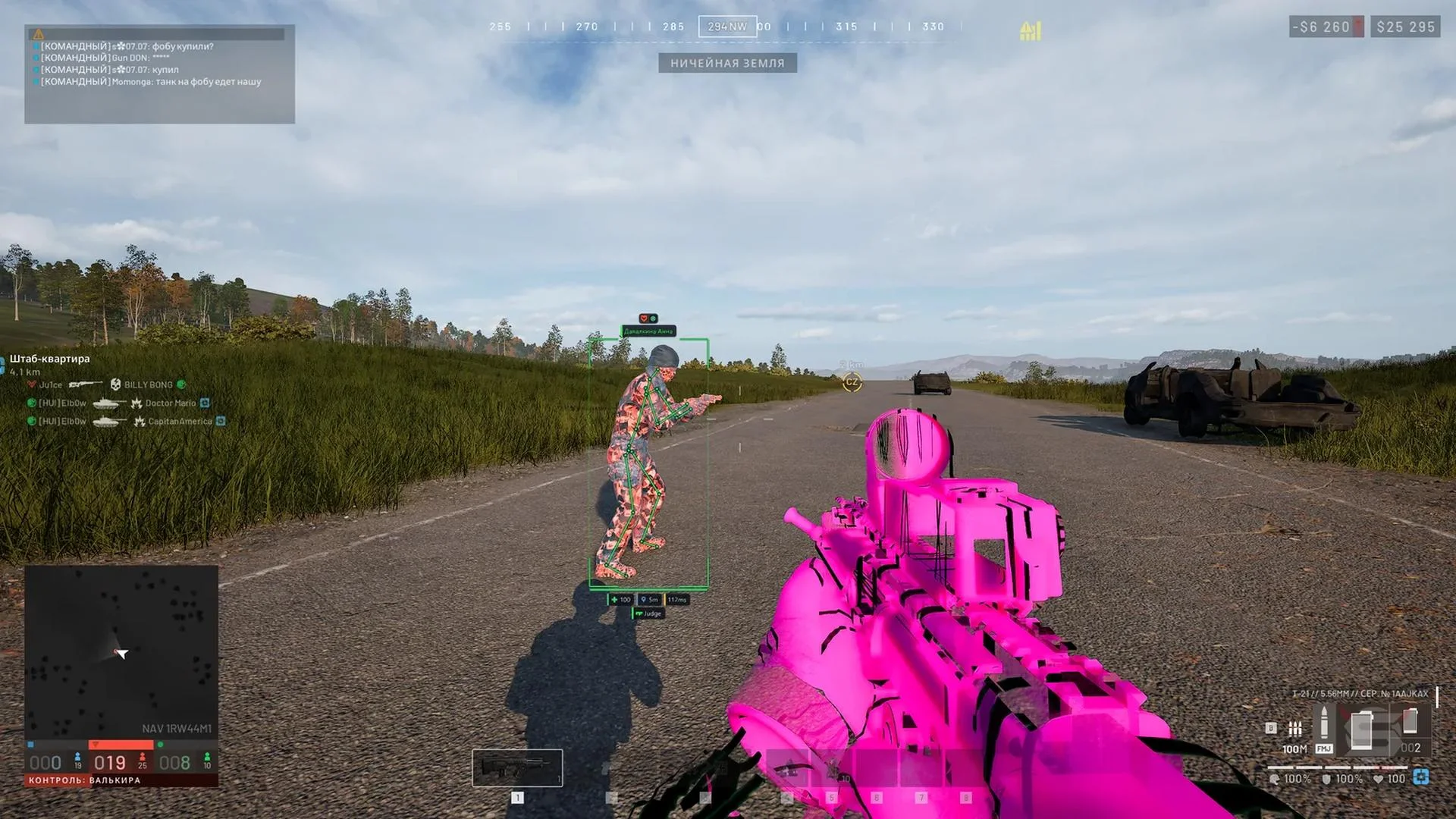
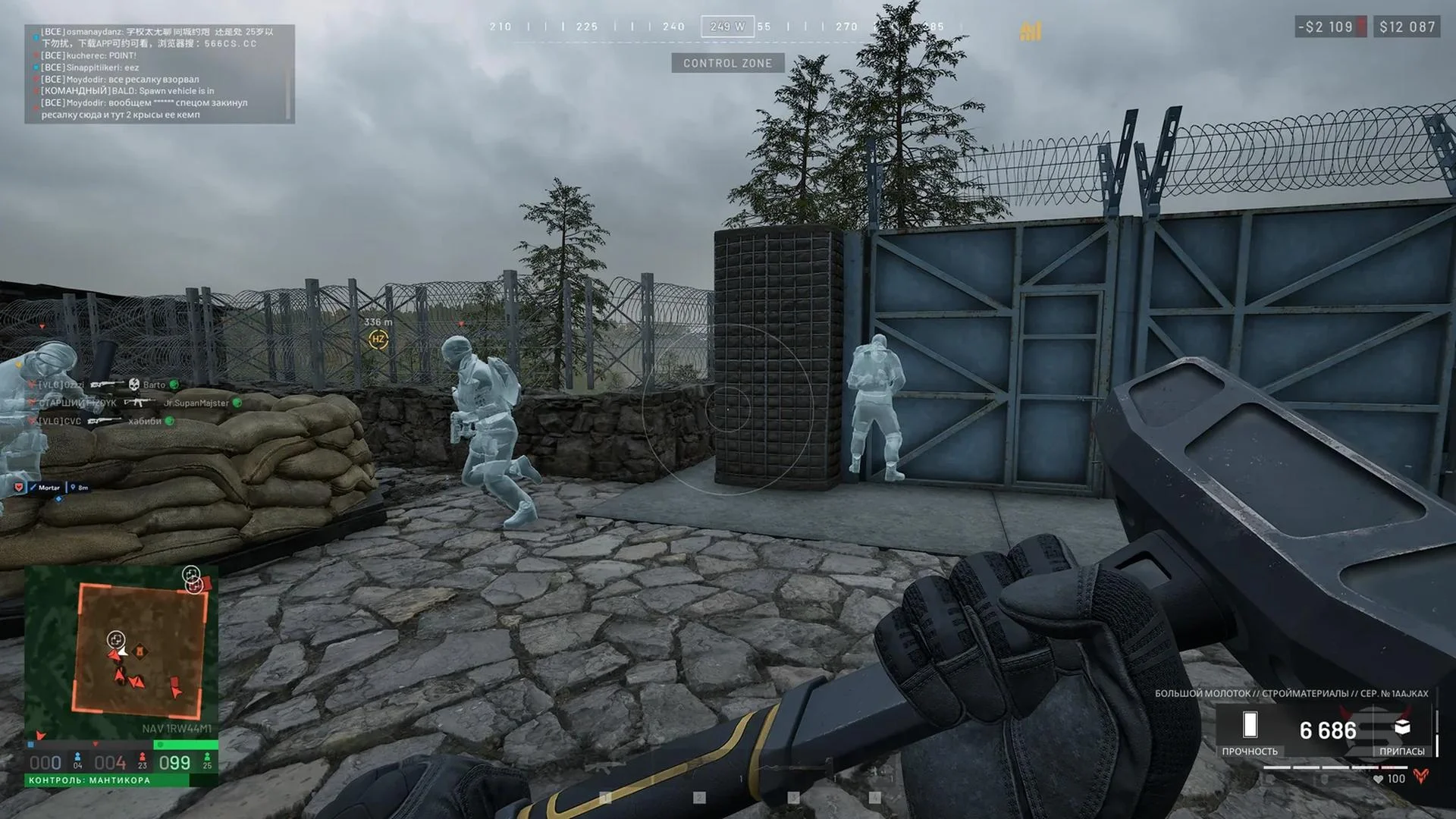
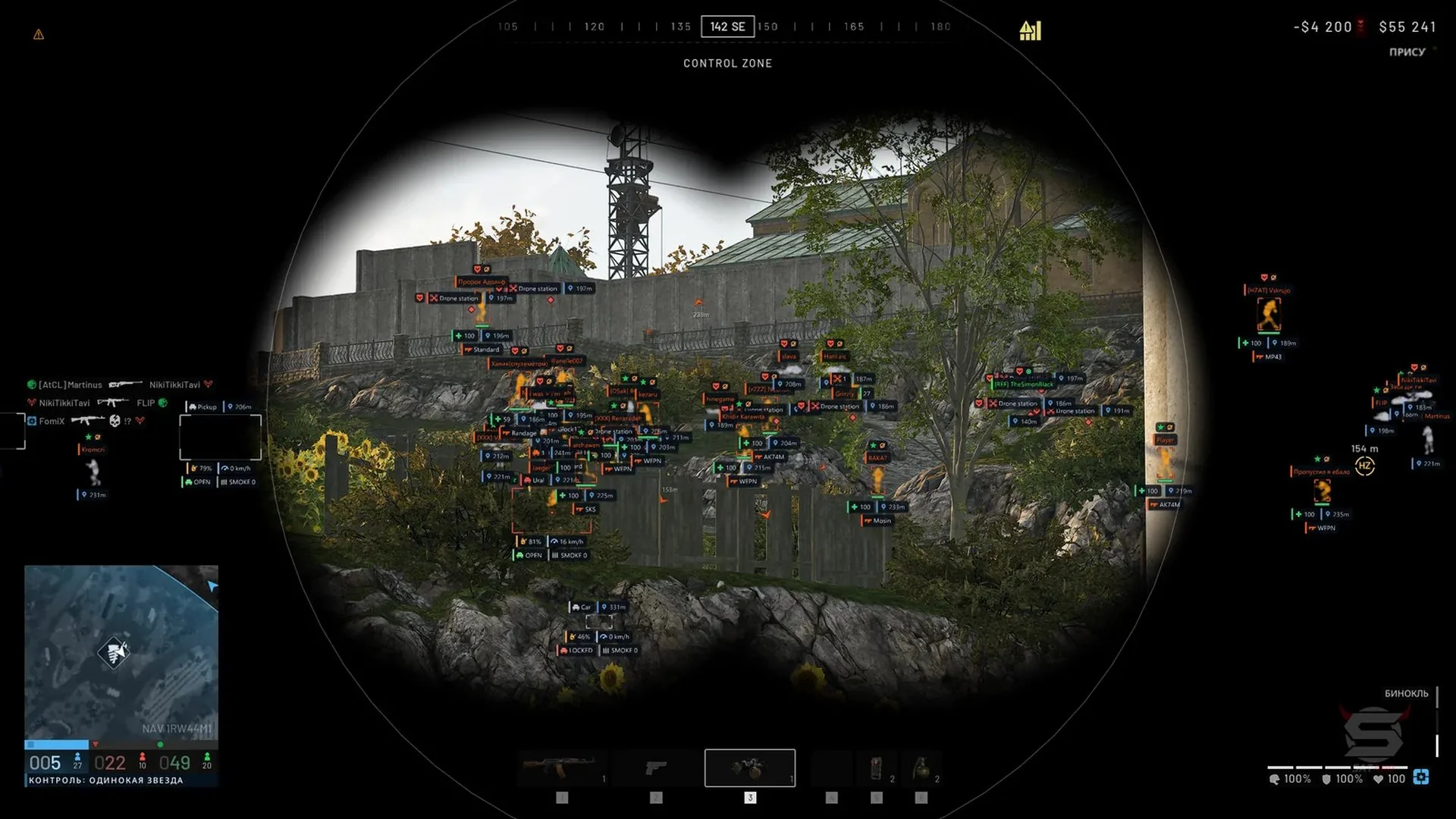
PHOENIX is a multi-feature cheat for Wardogs centered on combat controls and battlefield awareness. Its targeting options are complemented by an artillery calculator, while the visual tools provide information about players, vehicles and map objects. Highlighting and graphics controls let users tailor the presentation to different in-game tasks.
Cheat status: Updated
AIMBOT
Enable or disable the aimbot
Dedicated aim activation key
Silent Aim — aim assistance without moving the camera
Teleport Bullet — sends a fired projectile directly to the target
Select the head, neck, chest, pelvis or closest bone to the crosshair
Prioritize targets by distance or crosshair proximity
Adjust the targeting FOV
Adjustable aim smoothing
Maximum target acquisition distance
Visible-target-only aiming
Exclude downed players from target selection
Option to include friendly players in targeting
Keep the selected target locked while holding the aim key
Lead calculation for target movement and projectile drop
Recoil and camera movement compensation
Show the FOV circle
Mark the current aim point
Draw a line from the crosshair to the target
Target highlighting with TARGET and LOCKED indicators
Preview a potential target before engaging the aimbot
WEAPONS AND GRENADES
Remove weapon recoil
Remove bullet spread
Instant Bullet — redirect a shot to a visible target along the firing line
Instant aim-down-sights transition
Remove weapon sway
Remove ADS sway
Predict grenade throw trajectory
Show predicted grenade bounce points
Display the grenade blast radius
Identify targets within the blast radius
Auto-calibrate throw speed, fuse duration and blast radius
ARTILLERY CALCULATOR
L81 mortar aiming calculations
SPH-2 howitzer aiming calculations
Tank cannon impact-point prediction
Automatic, low-arc or high-arc projectile trajectory selection
Firing-readiness indicator when the gun is aligned
Information panel with range, aiming angle and miss offset
Visualize the calculated shell flight path
Mark the predicted shell impact point
Select an enemy or a custom map location as the target
Aim artillery toward an in-game ping
Track a moving player or vehicle target
Automatically align the gun toward the selected target
Incoming-shell warning with a red circle and notification
ESP for mortars, drone stations and gun emplacements
Display emplacement health and filter friendly equipment
PLAYER ESP
Player boxes: standard 2D, corner and 3D styles
Health as text, a bar or both
Show faction and squad as text or emblem
Maximum player ESP range
Player skeleton with adjustable line width
Player names
Distance to players
Equipped weapon display
Player visibility indicator
Player ping display
Shared information panel for vehicle crew members
Off-screen player arrows with configurable radius and size
Distance labels for off-screen arrows
Highlight players looking and aiming toward you
Separate colors for visible and occluded players
Toggle teammate ESP
Separate ESP options for downed players
Show loot on fallen players' bodies
Hotkey combat mode to toggle selected ESP categories
Restrict full ESP to inside or outside a crosshair-centered circle
Customize ESP label font, weight, size, shadow, outline and background
LOOT AND WORLD ESP
Loot names with an independent display distance
Filters for weapons, ammunition, medical items, armor, supplies and crates
Individual colors for loot categories
World-object names and distances
Grenade danger warnings
Blast radius and lethal-zone visualization
Mines and claymores with trigger radii
Other deployable-object ESP
Drones and remote devices with threat alerts
Option to show friendly mines and drones
Grounded grenade markers
C4 and other explosives ESP
Objective and mission-object markers
Repair and refueling points
Radio markers
Supply drop markers
Helicopter world markers
Safe-zone markers
VEHICLE ESP
Vehicle corner boxes, 2D and 3D boxes
Vehicle markers
Vehicle names
Lines to vehicles
Vehicle health display
Vehicle status display
Vehicle fuel level
Fuel tank leak indicator
Vehicle speed display
Vehicle lock status
Remaining smoke charges and countermeasure flares
Filter friendly, enemy and neutral vehicles
Vehicle-owner faction name and emblem
Vehicle marker coloring by team or faction
Nearby vehicles list with distances
Automatic flare deployment for aircraft
Missile lock warning
Incoming missile time-to-impact display
CHAMS AND MODELS
Player Chams with selectable materials and textures
Visibility-based or dual-layer through-wall rendering
Solid color, wireframe and tinted player materials
Additional color or material overlay
Through-wall player model rendering
Different colors by team and visibility status
Material glow strength
Automatic in-match material selection
Hand Chams
Select hand mesh or model variant
Rainbow effect for hands with optional weapon inclusion
GLOW AND HIGHLIGHTS
Player silhouette glow
Soft, neon, outline and bright glow presets
Select enemies, teammates and downed players for glow
Distance-based glow fading
Always-on, visible-only or through-wall glow
Soft glow, neon, outline or fill styles
Color by team, visibility, health or rainbow effect
Pulsating glow
World-object, loot and vehicle glow
World glow presets: soft, beacon or radar
Object glow as halos, rings, beams or combinations
Select object categories for highlighting
Glowing vehicle frame
Red alert for explosives and grenades within 15 meters
Reuse ESP palette for glow colors
RADAR AND GAME MAP
Circular or square radar with adjustable range, size and opacity
Rotate the radar with viewing direction
Radar coordinate grid
Player view cone
Relative target-elevation indicators
Clamp distant markers to radar edges
Filters for enemies, teammates, downed players, vehicles and objects
Radar markers for loot categories and corpse loot
Show enemies, downed players and vehicles on the game map
Game-map marker colors based on faction
CAMERA AND DISPLAY
Adjustable camera field of view
Hotkey-controlled screen zoom
Option to remove the zoom limit
Free camera with WASD and vertical movement
Adjustable free-camera speed
Third-person camera
Adjustable weapon model offset in three directions
Fullbright world brightness adjustment
Disable fog
Remove suppression visual effects
Disable tinnitus effects
Disable particle effects
Hide foliage
Disable shadows
Disable antialiasing
Disable surface decals
Disable surface translucency
Graphics optimization profiles: light, medium, strong and maximum
Visible bullet tracers
WEATHER AND VISUAL EFFECTS
Visual presets including clear day, night, storm, neon and noir
Adjust saturation, contrast, gamma, brightness, exposure, shadows and tint
White balance with temperature and green-magenta tint
Separate color grading for shadows, midtones and highlights
Lens bloom, threshold and chromatic-aberration controls
Edge vignette effect
Sky color, brightness and haze
Cloud density and color
Fog density and color
Time-of-day and sun-position controls
Sunlight and skylight brightness and color
Wind strength and speed controls
Rain intensity, color, splash and precipitation effects
Hit effects, sparks and tracers with scale and count controls
ADDITIONAL FEATURES
Faster hold-to-interact actions
Infinite stamina
Automatic active reload for vehicles and artillery
Hammer strikes directed to the yellow construction marker without moving the camera
Save and load configurations
Multiple independent configuration profiles
Cheat Update history
Hosting Update
The following games are now back online:
- PUBG
- APEX
- WARDOGS
- RUST ALKAD
- SPOOFER
- DAYZ
- ARK SURVIVAL EVOLVED/ASCENDED
- SCUM
- HUNT: SHOWDOWN CHAMS
- PALWORLD
- GRAY ZONE WARFARE
- MECCHA CHAMELEON
2026-11-03 09:10:37
Hosting Issues
We are experiencing an issue with our hosting provider.
As a result, you may encounter problems launching the Loader, or the connection to it might be unstable.
We will post an update once everything is back up and running.
2026-11-02 08:56:49
The server work is completed, it is necessary to transfer the loader, otherwise there will be an invalid error with the key.
2026-05-08 19:04:48
Buy similar cheats

ANCIENT
from 3$
KERNEL / KERNAIM
from 12$
FECURITY
from 3$
SMG
from 3.8$
DIVISION
from 24$
DULLWAVE
from 3.8$
GHOST
from 3.8$
BYSTER
from 3.2$
MEMEZ
from 2.5$
CROOKED ARMS
from 3.8$
GHOST ESP
from 2.6$
LEX
from 4.5$
HYPER VISOR
from 3.2$
KLAR
from 6$
PUSSYCAT
from 3.8$
ARCANE
from 4$
UDP
from 3$
UNKNOWN
from 2.5$
CONNECT
from 5$
WING RADAR
from 55$
SHACK WAR DOGS
from 8$